Posts

Showing posts with the label RAW conversion

Is my PC quick enough for my photo software

Image
Modern photo processing software, including RAW conversion and the many filter type packages, can use a lot of computer resources . To make matters worse AI processing is increasingly being used for things like mask selection and this is demanding on processor capacity, often being pushed from the CPU onto a dedicated GPU. Usually the required computer specification for a given piece of software is provided in  minimum and recommended variants and performance can be decidedly poor at the minimum end of things. This can give rise to questions such as "is my machine good enough" and if not then "what should I upgrade to make it better". Example specs for DXO PhotoLab 9 The good news is there are tools to check performance that we can easily run to help see potential bottlenecks, taking some of the guesswork out of it. In a windows environment (Windows 11 or older editions) we can run Task Manager . To do this you can use the keyboard shortcut Ctrl + Shift + Esc, or r...

DXO PhotoLab 9

Image
I have recently purchased DXO PhotoLab 9 , a RAW photo editing software package, and here I'll give an outline of why I changed over to this software and what my first impressions are after the first couple of weeks using it. DXO PhotoLab v9 So how did I get here? Well, like many, I had used Lightroom but when they moved over to subscription only I jumped ship, opting for a one-time license to save money. At that time I chose to go with Capture One Pro (COP), with a general aim to buy an upgrade maybe every other major release. Capture One worked well and I was happy with it but they then also changed their payment model, pushing subscriptions and making the one-off license a very limited and expensive alternative. So I have been treading water for a couple of years, just ticking over with my old version, but this of course means no support for newer camera models and no new functionality. COP supports the (very expensive) Phase One cameras and is also very good at tethering for th...

Choosing a new laptop - the Elimina Pro

Image
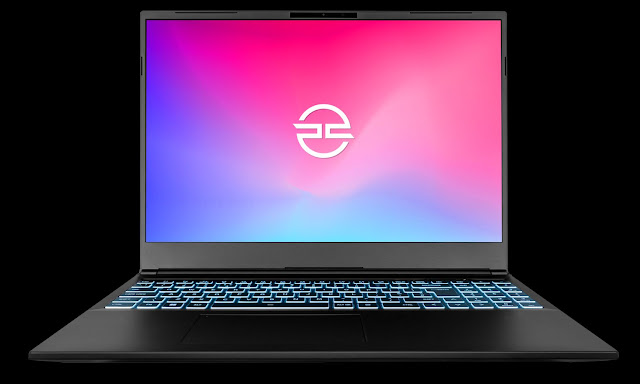
With my old laptop being 10 years old it felt overdue for replacement. It could not be upgraded to Windows 11, the battery charge would not last more than a few minutes and performance was generally slow so time to see what the latest tech could offer. Elimina Pro I was looking for something that would be good for photo editing along with a little video editing and maybe a little gaming. I would expect to mostly use the laptop plugged in to a power supply and not on the move so a larger high-res screen would be the preference. This in turn suggests a dedicated GPU which means ultra thin cases would not be an option. As off the shelf laptop configurations often have poor screens, are usually short on memory and short on storage space I was therefore looking for a custom build. As a company I've used before, PC Specialist came to mind. I based the build on one of their Elimina Pro laptops, choosing a 16 inch screen (diagonal measurement) as a good compromise size and opted for highe...

Affinity Photo 2

Image
Following the proposed changes to the perpetual licenses for Capture One I've been starting to look at other options. Affinity Photo recently released a major update, Affinity Photo 2 , with a special promotion price so I had a closer look. Although I was aware Affinity have a good following I'd previously ruled it out as being an Apple only option, however it seems I was mistaken, this was only true in their very early days and their packages now come with Windows as an option.       For those that are familiar with Photoshop they will find that Affinity Photo works in a similar way. It is split into a few different modules, which they call personas, the main two being Photo (like Adobe's ACR) and Develop (along with personas for Liquify, Tone Mapping and Export). The RAW module has a good list of cameras supported and includes support for Fujifilm xtrans sensors. With Photo 2 they describe the RAW as non-destructive, in reality it was anyway, what they really mea...

Capture One 21 Pro upgrade

Image
I've recently upgraded my version of Capture One Pro from 12 to 21, this has been a relatively painless and straightforward upgrade.   Capture One 21 Pro splash screen Please note that this was only a jump of two major versions though it may seem more from the numbering. So after version 12 came version 20 (build 13) and then followed by version 21 (build 14).   Capture One 21 Pro About screen   My decision to upgrade was prompted by a planned move from X-T1 to X-T4 for my Fuji shooting, to handle the raw files from an X-T4 requires a newer version of COP than 12 so hence the upgrade. I had two basic upgrade options: Wait for the next new version. Probably out in the new year but feature list unknown, likely to be full price and possibly with a few bugs initially. Buy the current version when Phase One run there next promotion offer. This gives me a new version without undue delay, a tried and tested stable version and a lower cost. I chose the latter option and picked up...

Taking Capture One Pro for a test drive

Image
I've already spent some time investigating Lightroom alternatives and identified Capture One as looking likely but you can only get so far with reading reviews and looking at tutorial videos so it was time for me to get hands on with Capture One Pro. My intention is to put Capture One through it's paces for those aspects that matter to me but not to run through every single function or option and not to compare with Lightroom at a pixel by pixel level. I started out simply by going onto the Phase One site, entering a few basic details and then being emailed a download link. Capture One About Once installed I fired it up and created a new empty catalog (tip: I located this on my SSD drive to improve performance). Tip: once installed this is a good moment to review and edit preferences, you'll want to check the "Preview Image Size", it defaults to 2560 pixels, set lower if your screen resolution is lower to avoid having unnecessarily large preview files (NB...

Choosing a Lightroom alternative

Image
Back in 2017 I upgraded my Lightroom for the last time , essentially this was a decision not to move to Adobe's subscription model , along with various miscellaneous grumbles about the quality of the application. At that time I planned to just keep running the old version of Lightroom and keep my options open. However a year on from that I found that my Lightroom Map module had stopped working ( https://helpx.adobe.com/lightroom/kb/map-view-no-longer-supported.html ) and this prompted me to give the question of switching raw processing engine a fresh look. The map module issue was a simple one, the Google Maps API had changed and Adobe decided they would only fix this on their latest products. In itself this is not a massive issue for me, it's something I could live without but when and what else will stop working with my version 6 Lightroom, dating back to 2015, as my Windows 10 environment has regular ongoing changes and updates? LR 6.13 Map Module So what raw convert...

My last Lightroom upgrade

Image
I can't remember when I made the move from shooting in camera jpg to shooting raw but it would probably be around ten years ago. At a similar time I started with Adobe Lightroom , the two going nicely hand in hand. Lightroom has scored for its overall combination of library and development modules, allowing convenient raw processing. Over the years I've gone for each major Lightroom release, the easy option of just buying an update license at around £50 every 18 months or so, and staying with the desktop version. Lightroom 6.13 splash screen However for some time it's been clear that Adobe's preference has been for monthly subscriptions and for cloud based options. Now with release 6.13 it's been the final update for the standalone version and it's missing some of the functionality of the 'Classic' version. The subscription model would work out more expensive and so it prompts me to review my options. Lightroom certainly has its shortcomings ;...